
FISH.OS - IDLE FISHING SIMULATOR
Idle Fishing Simulator • Roblox
FISH.OS Wiki - Roblox Idle Fishing Simulator
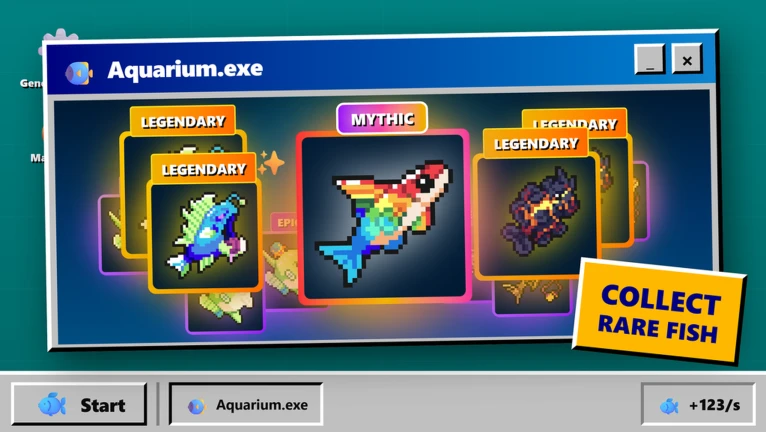
This FISH.OS wiki covers every core system — fishing mechanics, fleet building, the live market, prestige resets, aquarium collection, and active codes — so you can optimize your progression from first cast to legendary angler.
Lore & Trivia
Overview
FISH.OS is an idle fishing simulator on Roblox that puts a retro operating system interface at the center of its experience. Developed by ORCO and launched in early March 2026, it challenges the typical idle clicker formula by layering a live economic market, fleet management, and a deep collection system on top of tap-to-fish mechanics.
The core loop is straightforward: catch fish, sell them on a fluctuating market, upgrade your fleet, and prestige for permanent bonuses. What makes FISH.OS stand out from other Roblox fishing games is its retro OS presentation — the entire UI is styled like a vintage desktop operating system, complete with instant-messaging-style chat windows that evoke classic AIM or ICQ. The April 2026 major update expanded nearly every system, adding guild tournaments, fleet independence, improved market timing signals, and aquarium interactivity.
Last verified: April 13, 2026. The game is in active Beta — feature details and balancing may change between updates.
Quick Facts
| Item | Details |
|---|---|
| Developer | ORCO |
| Experience Name | FISH.OS - IDLE FISHING SIMULATOR |
| Genre (Roblox L1/L2) | Simulation / Incremental Simulator |
| Created (UTC) | March 6, 2026 |
| Last Major Update (UTC) | April 12, 2026 |
| Server Size | 50 players |
| Universe ID | (verify in Roblox Open Source API) |
| Root Place ID | 123368132872113 |
Live Stats Snapshot (April 13, 2026)
These numbers reflect live Roblox service metrics and change frequently. Source: official Roblox APIs, snapshot April 13, 2026.
| Metric | Value |
|---|---|
| Active Players | ~595 |
| Total Visits | ~428,900 |
| Favorites | ~13,411 |
Related Pages
- FISH.OS Codes — active codes, redemption steps, and troubleshooting
- FISH.OS Beginner Guide — step-by-step walkthrough for new players
Features at a Glance
- Fishing: tap or auto-fish to catch 200+ unique fish across rarity tiers
- Fleet Management: add and independently manage multiple boats to multiply your Fish per Second
- Live Market: real-time price fluctuations reward active market timing
- Prestige System: reset progress for permanent bonuses and unlock higher-tier content
- Aquarium: display your rarest catches as a permanent trophy wall
- Trading: nearly every item and fish is tradable between players
- Guilds & Tournaments: compete on multiple leaderboard categories with your guild
- Retro OS Aesthetic: distinctive vintage desktop UI unlike any other Roblox fishing game
Gameplay Loop
- Cast your line (manual tap or auto-fish)
- Catch fish from various rarity tiers
- Watch market prices and sell at optimal moments
- Earn Coins to upgrade boats and unlock fleet slots
- Expand your collection and fill your aquarium with rare specimens
- Prestige when growth slows to unlock new bonuses
- Repeat with improved efficiency
For a step-by-step walkthrough of this loop, see the Beginner Guide.
Fishing
Fishing in FISH.OS is the foundation of all progression. You catch fish by tapping the water during active fishing sessions, and a bobber mini-game gives you a chance at rarer catches when you time your clicks precisely. The auto-fish feature handles the loop for you, making the game comfortable to play passively.
As you progress, fish become weirder and more valuable the deeper you fish. The game tracks every species you have ever caught in the Fish-pedia, a living bestiary that expands with each new discovery.
Premium members receive more fish per fishing session, giving paying players a tangible progression advantage.
Fleet
The fleet system is one of FISH.OS's most important progression levers. Rather than a single fishing rod, you manage a fleet of boats — each contributing to your total Fish per Second output. The April 2026 update made each boat independently manageable, meaning you can optimize vessel assignments individually.
Fleet upgrades are a primary use for both Coins and Black Pearls, the game's premium currency. Black Pearls unlock certain upgrades that Coins cannot.
Market
The live fish market sets FISH.OS apart from most Roblox fishing games. Prices on every fish type fluctuate in real time, creating genuine economic decisions: hold a rare catch when prices are low, or sell immediately to lock in profit. The April 2026 update improved market timing signals to make these decisions clearer for new players.
Active market engagement meaningfully accelerates progression compared to blindly selling every catch on cooldown.
Prestige
Prestige resets your current progress — Coins, fish, and some upgrades — but grants permanent bonuses that compound across resets. The April 2026 rework made each prestige milestone feel more impactful by tying thresholds to deeper progression rather than treating it purely as a reset mechanic.
Strategic prestige timing is a core late-game decision: reset too early and you forfeit too much; wait too long and growth slows to a crawl.
Aquarium
The aquarium is your personal showcase and trophy wall. Display rare and legendary fish you have caught to flex your collection to other players. Fish in your aquarium now interact more dynamically following the April 2026 update.
Fish-pedia, the collection tracker, received new entries tied to the update content, expanding what players can discover and catalog.
Trading
Almost everything in FISH.OS is tradable, including fish, equipment, and premium currency. This creates an organic player-driven economy where rarer species hold genuine trading value. Collectors seek specific fish; farmers offload duplicates — creating a dynamic that mirrors real-world commodity and collector markets.
Codes
Promo codes provide free Coins, Black Pearls, and occasionally rare fish. Active codes are listed on the FISH.OS codes page with exact redemption steps. Codes are typically released around major updates, community milestones, or as compensation for server issues.
FAQ
What is FISH.OS on Roblox?
FISH.OS is an idle fishing clicker developed by ORCO. Players tap to fish, manage a fleet of boats, sell catches on a live market with real-time price fluctuations, and collect rare fish in their aquarium. It stands out for its retro operating system UI aesthetic and its 200+ collectible fish.
How do you earn Coins faster in FISH.OS?
The fastest coin growth comes from combining two habits: maximizing your Fish per Second through fleet upgrades and actively timing the live market to sell when prices are high rather than immediately offloading every catch. Prestige resets also compound long-term earnings when timed correctly.
What is the prestige system in FISH.OS?
Prestige resets your current run's progress and grants permanent bonuses that persist after each reset. After the April 2026 rework, prestige thresholds connect to deeper progression layers rather than just unlocking boats or slots — making each reset feel more rewarding.
Are there codes for FISH.OS?
Yes. Active codes are listed on the codes page. Codes are released around updates, community milestones, and events. Join the official Discord for the fastest notifications when new codes drop.
What makes FISH.OS different from other Roblox fishing games?
The retro desktop OS UI is the most visually distinctive feature — the entire interface mimics a vintage operating system, including chat windows styled after classic instant messengers. The live market with real-time price fluctuation and the fleet management system are also meaningfully different from most Roblox fishing titles, which typically use static pricing and single-rod mechanics.
Discussion
Sign in to join the discussion.